FiveM banking with player-owned banks.
fivemshop-bank is an open source Fleeca banking script from The FiveM Shop. Personal accounts, ATMs, transfers, player-owned branches, and money delivery for QBCore, Qbox, and ESX. $18.99. Buy the script, then check your email for the download link.
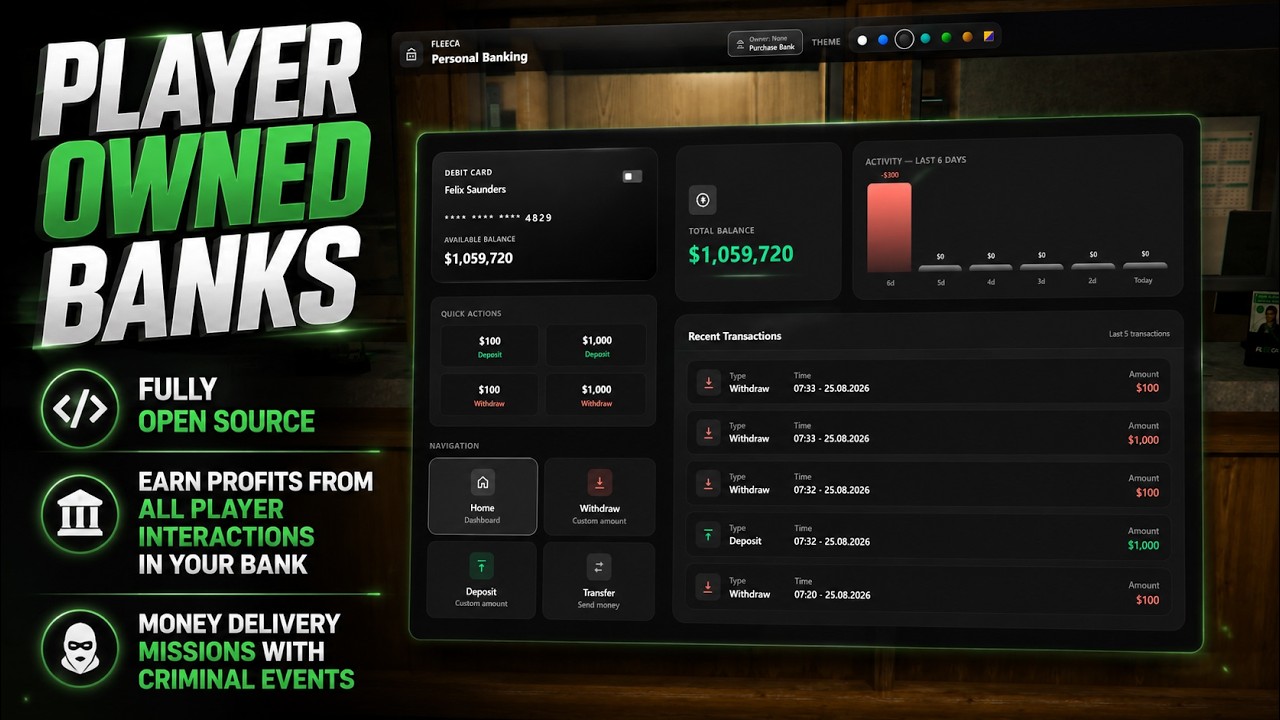
About this FiveM bank script
fivemshop-bank is a paid open source FiveM banking resource made by Lighthouse at The FiveM Shop. Players walk into a Fleeca branch or an ATM, press E, and get a full personal banking UI: debit card balance, quick $100 / $1,000 deposit and withdraw, custom amounts, transfers by server ID, a six-day activity chart, and recent transactions.
The same resource adds an economy loop for owners. Eight vanilla bank locations can be purchased as player-owned branches. The owner names the bank, earns a configurable fee on customer deposits and withdrawals, collects profit, runs a stockade money delivery, and can sell the branch back. ATMs stay personal-only. You have to be at the branch to buy or manage it.
The files are fully open source. There is no escrow and no hidden code. Buy the script, then check your email for the download link. Weekly updates are included. Keep your edited shared/config.lua when you drop in a new build.
Features
- Fleeca personal banking UI with multiple themes (light, ocean, midnight, teal, cyber, noir, pixel).
- Deposit, withdraw, and transfer by player server ID with live balance and history.
- Quick actions for $100 and $1,000 plus custom amount forms.
- ATM support for
prop_atm_01,prop_atm_02,prop_atm_03, andprop_fleeca_atm. - Map blips for every configured bank location.
- Player-owned branches: buy, rename, collect profit, sell, one bank per player.
- Configurable deposit and withdraw fees paid to the branch owner (default 30%).
- Owner dashboard with profit, deliveries, robberies, revenue mix, and activity history.
- Money delivery: spawn a stockade, load cash, drive back, carry bags in with F, deposit at your branch.
- Owner emergency alert that places a map blip for other players.
- QBCore, Qbox, and ESX money with auto-detect. mysql-async, oxmysql, or ghmattimysql.
- Open source Lua and NUI. Free weekly updates from Lighthouse.
Compatibility
This FiveM bank script is built for QBCore, Qbox, and ESX. Leave Config.Framework = "auto" unless you want to lock it to "qb" or "esx". Qbox servers that start qb-core or qbx_core with QB money accounts work the same way. Set Config.Mysql to the MySQL resource you actually run: mysql-async, oxmysql, or ghmattimysql.
Stop or hide any other banking NUI that uses the same Fleeca interiors and ATMs so two menus do not overlap. Test on a staging server first and confirm cash, bank, transfers, ownership, and delivery before going live.
How to use
- Walk to a Fleeca marker or an ATM and press E to open Personal Banking.
- Use quick deposit/withdraw, or open Deposit, Withdraw, or Transfer for a custom amount.
- Transfers need the other player’s server ID. You cannot send money to yourself.
- Press ESC to close the UI.
- At a branch (not an ATM), open Branch Ownership to buy the location if it is free.
- Owners collect profit, start Money Delivery, send an Emergency Alert, or sell the branch.
Money delivery
- From the owner panel, start Money Delivery. A stockade spawns at the branch vehicle point.
- Drive to the load location, stay in the truck, press E to load cash.
- Drive back and park at the branch. Press F at the rear of the truck to take a bag.
- Carry the bag into your bank and press F to deposit. Repeat until every bag is in.
- Each bag adds random profit to the branch. Completing the run pays the delivery reward in cash.
Install tutorial
- Buy the script, then check your email for the download link. Extract fivemshop-bank from the archive.
- Import
sql.sqlinto your database. This createsfivemshop-bankl,player_banks, andplayer_banks_log, and seeds the eight branches. - Copy the fivemshop-bank folder into your FiveM
resourcesdirectory. Keep the folder name exactlyfivemshop-bank. - Open
server.cfgand addensure fivemshop-bankafter your framework and MySQL resource. - Edit
shared/config.luafor framework, MySQL, bank coords, ATM props, fees, and delivery. - Restart the server, or run
ensure fivemshop-bankin the console. - Join, press E at a Fleeca, confirm cash and bank, then test a transfer and an owner purchase on a test character.
config.lua options
- Config.Mysql —
mysql-async,oxmysql, orghmattimysql. - Config.Framework —
auto,qb, oresx. - Config.Distance — how close a player must be to open a bank marker. Default 3.
- Config.Atms — ATM prop names the script looks for.
- Config.Bank — world coordinates for bank markers and blips.
- Config.Blip — map name, sprite, color, and scale. Default name is Fleeca Bank.
- Config.Langs — every on-screen prompt and notify string.
- Config.PlayerBanks.Enabled — turn player-owned branches on or off.
- DepositFeePercent / WithdrawFeePercent — fee taken from customer transactions for the owner. Default 30.
- SellPrice — bank payout when the owner sells. Default 100000.
- Locations — eight branches with name, coords, purchase price, and vehicle spawn.
- MoneyDeliveryLocation — where the stockade loads cash.
- DeliveryReward — cash paid when every bag is deposited. Default 100000.
- DeliveryBags — bags per run. Default 3.
- DeliveryBagProfitMin / Max — profit added per deposited bag.
- DeliveryBag — prop model, carry animation, bone, and attach offsets.
Developer exports
Call these from another resource after fivemshop-bank is started. Keep the resource name fivemshop-bank.
Client
exports['fivemshop-bank']:OpenBank()— open personal banking at the closest branch.exports['fivemshop-bank']:OpenAtm()— open the same UI in ATM mode (no branch purchase).exports['fivemshop-bank']:CloseBank()— close the NUI and release focus.exports['fivemshop-bank']:GetClosestBankKey()— returns the nearest player-bank key, or pass avector3.exports['fivemshop-bank']:IsDeliveryActive()— true while the owner is on a money run.exports['fivemshop-bank']:IsBankOpen()— true when the player opened from a branch, not an ATM.
Server
exports['fivemshop-bank']:GetFrameworkName()— returnsqboresx.exports['fivemshop-bank']:GetPlayerBank(bankKey)— row fromplayer_banks.exports['fivemshop-bank']:GetOwnedBankKey(identifier)— the bank key that identifier owns, or nil.exports['fivemshop-bank']:GetBankLocation(bankKey)— name, coords, price, and vehicle spawn from config.exports['fivemshop-bank']:AddBankProfit(bankKey, amount, logTyp, logLabel)— add profit and write the activity log.exports['fivemshop-bank']:BuildPlayerBankInfo(src, bankKey)— owner UI payload for that player.
After you buy
Pay $18.99, then check your email for the download link. If it does not arrive, email [email protected] with your receipt. Weekly updates are free: replace the resource, keep your shared/config.lua, and restart.